本文適用於以下產品:WithSecure Business Suite (BS) 16
功能說明:
本文說明在地端中控台如何設定向指定中控台進行更新之方式。
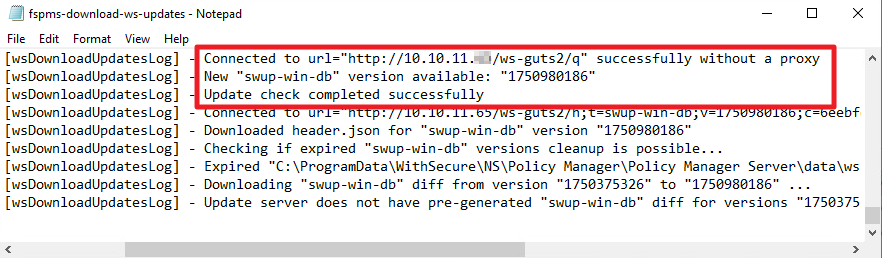
1.一般來說可對外連線的中控台將與原廠伺服器位置https://guts2.fsapi.com/ 取得更新,
詳細內容更新可在中控台主機路徑下
C:\ProgramData\WithSecure\NS\Policy Manager\Policy Manager Server\log 中的
fspms-download-ws-updates.txt記事本內容進行確認。

2.設定Policy Manager伺服器以使用代理位置作為病毒定義的來源
開啟登陸編輯程式(regedit)並前往以下路徑:
HKLM\SOFTWARE\WithSecure\Policy Manager\
Policy Manager Server\additional_java_args
新增additional_java_args內的的字串值:
-DwsGuts2ServerUrl= http://<代理程式位址>/ws-guts2

設定完畢後重啟中控台的服務
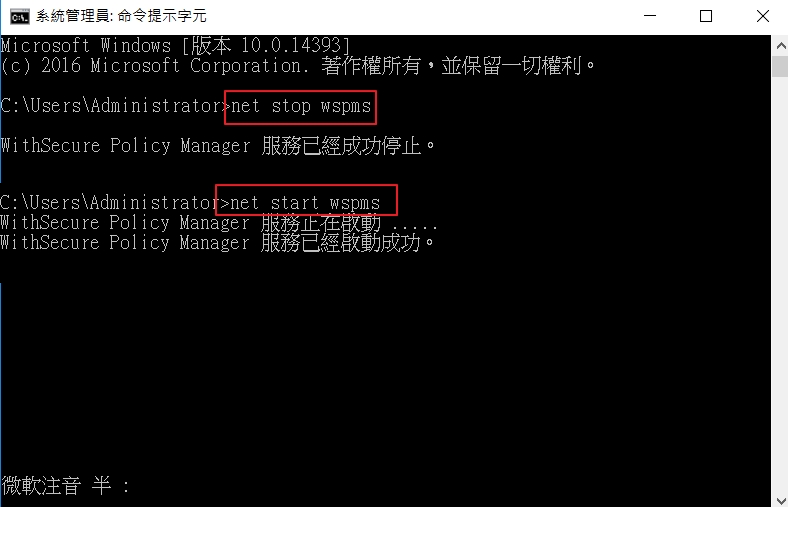
請以管理員身分開啟命令提示字元,輸入net stop wspms停止服務
再輸入net start wspms以開啟服務
3.隨後設定完畢的Policy Manager更新位置將指向代理位置進行更新,
詳細內容更新可在更新後的中控台主機路徑下
C:\ProgramData\WithSecure\NS\Policy Manager\Policy Manager Server\log 中的
fspms-download-ws-updates.txt記事本內容進行確認。